

Description
Logitech Combo Touch Keyboard Case – Designed for iPad Pro
Key Specifications
The Logitech Combo Touch is a protective, full-featured keyboard case for iPad Pro, delivering a versatile typing experience, adjustable stand, and large trackpad — giving your iPad Pro a true laptop feel when needed, with the convenience of a tablet when you detach it.
Keyboard Layout: Full-size with backlit keys, iPadOS shortcut row
Trackpad: Large clickable trackpad with multi-touch gesture support
Connectivity: Smart Connector (no Bluetooth needed)
Power Supply: Draws power from the iPad — no batteries required
Build Material: Rigid shell, soft-touch interior lining
Compatibility: iPad Pro models that support Smart Connector
Use Modes: Type, View, Sketch, Read
Keyboard & Typing Features
Multi-Mode Use
The case includes a detachable back-lit keyboard with scissor switches for comfortable, precise typing.
The full-size layout includes iPadOS shortcut keys, media controls, and other dedicated functions.
Equipped with a large trackpad that supports multi-touch gestures, giving you macOS-like navigation and productivity.
Type Mode – Use the keyboard and trackpad for productivity scenarios like writing, spreadsheets, or long-form typing.
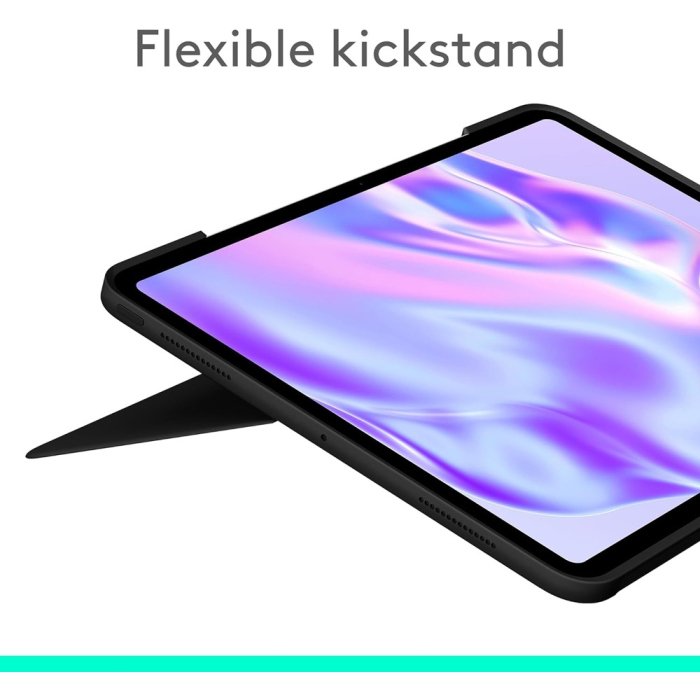
View Mode – Adjust the kickstand to hold your iPad at a comfortable angle for viewing, video calls, or streaming content.
Sketch Mode – Fold the back to lay the iPad flat for drawing with Apple Pencil, note-taking, or marking up documents.
Read Mode – The case supports a folded position that provides a stable base for reading or browsing content.
Protection & Build
Power & Connectivity
Provides durable protection for both front and back of the iPad Pro with a hard shell case.
Built-in magnets secure the iPad Pro in place and keep the keyboard attached when in use.
Offers precise cutouts for ports, enabling full access to USB-C, camera, and speakers without removing the case.
The keyboard connects via the iPad’s Smart Connector, so no separate pairing or charging is needed — keyboard power is drawn directly from the iPad.
The trackpad and keyboard work seamlessly together, enabling shortcuts, multi-touch gestures, and productivity workflows with ease.
Why Choose the Combo Touch
If you want to transform your iPad Pro into a productivity powerhouse, the Combo Touch delivers. It’s ideal for writing, sketching, creative work, content creation, and hybrid usage — offering a blend of portability, protection, and input flexibility that rivals traditional laptops.