
Description
Multiple PoE Options for Easy Installation
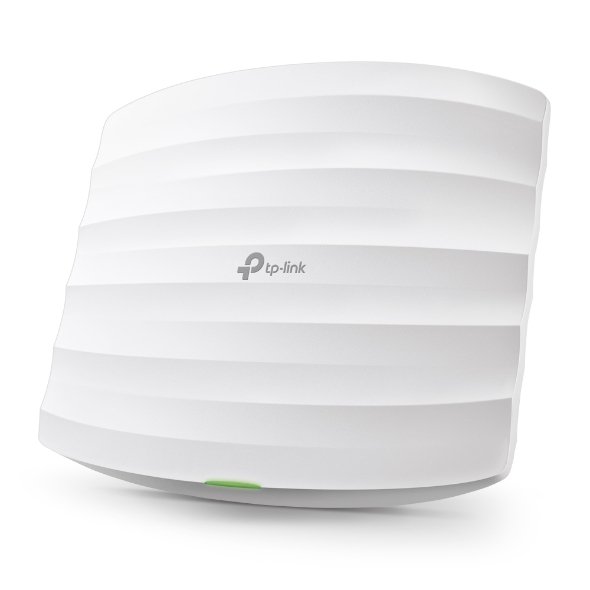
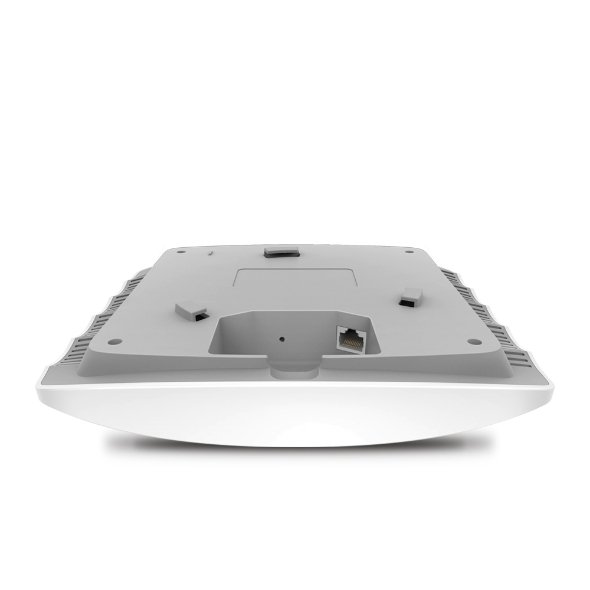
EAP225 supports both 802.3af PoE and Passive PoE power supply, can be either powered by a PoE switch or the provided PoE adapter, making deployment effortless and flexible.
Easy Management with the Omada App
Follow configuration instructions on the free Omada app to get set up in minutes. Omada lets you configure settings, monitor the network status and manage clients, all from the convenience of a smart phone or tablet.
| HARDWARE FEATURES | |
|---|---|
| Interface | Gigabit Ethernet (RJ-45) Port×1 (Support IEEE802.3af PoE and Passive PoE) |
| Physical Security Lock | Yes |
| Button | Reset |
| Power Supply | 802.3af/at PoE 24V Passive PoE (+4,5pins; -7,8pins. PoE Adapter Included) |
| Power Consumption | EU: 10.5 W US: 12.6 W |
| Dimensions ( W x D x H ) | 8.1 × 7.1 × 1.5 in (205.5 × 181.5 × 37.1 mm) |
| Dimensions | 8.1 × 7.1 × 1.5 in (205.5 × 181.5 × 37.1 mm) |
| Antenna Type | 3 Internal Omni 2.4 GHz: 4 dBi 5 GHz: 5 dBi |
| Mounting | Ceiling /Wall Mounting (Kits included) |
| WIRELESS FEATURES | |
|---|---|
| Wireless Standards | IEEE 802.11ac/n/g/b/a |
| Frequency | 2.4 GHz and 5 GHz |
| Signal Rate | 5 GHz:Up to 867 Mbps 2.4 GHz:Up to 450 Mbps |
| Wireless Functions | Multiple SSIDs (Up to 16 SSIDs, 8 for each band) Enable/Disable Wireless Radio Automatic Channel Assignment Transmit Power Control (Adjust Transmit Power on dBm) QoS(WMM) Seamless Roaming Band Steering Load Balance MU-MIMO Airtime Fairness Beamforming Rate Limit Reboot Schedule Wireless Schedule Wireless Statistics based on SSID/AP/Client |
| Wireless Security | Captive Portal Authentication Access Control Wireless Mac Address Filtering Wireless Isolation Between Clients SSID to VLAN Mapping Rogue AP Detection 802.1X Support |
| Transmission Power | CE: ?20 dBm(2.4 GHz, EIRP) ?23 dBm(5 GHz, EIRP) FCC: ?24 dBm(2.4 GHz) ?22 dBm(5 GHz) |
| MANAGEMENT | |
|---|---|
| Omada App | Yes |
| Centralized Management | Omada Cloud-Based Controller Omada Hardware Controller (OC300) Omada Hardware Controller (OC200) Omada Software Controller |
| Cloud Access | Yes (Through OC300, OC200, Omada Cloud-Based Controller, or Omada Software Controller) |
| Email Alerts | Yes |
| LED ON/OFF Control | Yes |
| Management MAC Access Control | Yes |
| SNMP | v1,v2c |
| System Logging Local/Remote Syslog | Local/Remote Syslog |
| SSH | Yes |
| Web-based Management | HTTP/HTTPS |
| L3 Management | Yes |
| Multi-site Management | Yes |
| Management VLAN | Yes |
| Zero-Touch Provisioning | Yes. Requiring the use of Omada Cloud-Based Controller (Supported by EAP225 V3.0, V4.0 and above, and is not supported by EAP225 V3.20) |
| OTHERS | |
|---|---|
| Certification | CE, FCC, RoHS |
| Package Contents | AC1350 Wireless MU-MIMO Gigabit Ceiling Mount Access Point EAP225 Passive PoE Adapter Power Cord Mounting Kits Installation Guide |
| System Requirements | Microsoft Windows XP, Vista, Windows 7, Windows 8, Windows10, Linux |
| Environment | Operating Temperature: 040 ? (32104 ?) Storage Temperature: -4070 ? (-40158 ?) Operating Humidity: 1090% RH non-condensing Storage Humidity: 590% RH non-condensing |
Reviews
There are no reviews yet.